
API stands for Application Programming Interface. It is a set of powerful protocols and essential tools that enable different software applications to seamlessly communicate with each other, making it a crucial element in modern technology integration.

API stands for Application Programming Interface. It is a set of protocols and tools that allows different software applications to communicate with each other. APIs define the methods and data formats that applications can use to request and exchange information. Here are some key points about APIs:
- Communication Bridge: APIs serve as a communication bridge between different software systems. They allow applications to access the functionality or data of other applications or services.
- Standardized Interface: APIs provide a standardized way for developers to interact with the functionality of a software component or service, abstracting the underlying implementation details.
- Request and Response: In a typical API interaction, one software component (the client) sends a request to another component (the server) using a predefined set of rules. The server processes the request and sends back a response.
- Data Exchange: APIs often facilitate the exchange of data in a structured format, such as JSON (JavaScript Object Notation) or XML (eXtensible Markup Language).
- Web APIs: Many APIs are web-based, allowing communication over the internet. Web APIs often use HTTP (Hypertext Transfer Protocol) for communication.
- RESTful APIs: Representational State Transfer (REST) is a commonly used architectural style for designing networked applications. RESTful APIs conform to REST principles, using standard HTTP methods (GET, POST, PUT, DELETE) for communication.
- Endpoints: APIs expose endpoints, which are specific URLs or URIs (Uniform Resource Identifiers) that represent different functionalities or resources. Clients interact with these endpoints to perform specific actions.
- Authentication: APIs often include mechanisms for authentication to ensure that only authorized users or applications can access their functionality.
- Documentation: API providers usually offer documentation that describes the available endpoints, request and response formats, authentication methods, and other relevant information for developers.
- Third-Party Integration: APIs enable third-party developers to integrate with existing services or platforms, promoting interoperability and allowing for the creation of new applications that leverage the capabilities of others.
Example: API Code in Python (Using a Public API)
Fetching Data Using a REST API:
import requests
# API endpoint
url = “https://jsonplaceholder.typicode.com/posts”
# Sending a GET request to fetch data
response = requests.get(url)
# Check if the request was successful
if response.status_code == 200:
data = response.json() # Convert JSON response to a Python dictionary
print(“Fetched Data:”, data[:5]) # Display the first 5 posts
else:
print(f”Failed to fetch data. Status Code: {response.status_code}”)
Sending Data Using a REST API:
# Data to send
new_post = {
    "title": "API Guide",
    "body": "This is a post about APIs!",
    "userId": 1
}

# Sending a POST request
response = requests.post(url, json=new_post)

if response.status_code == 201:  # HTTP status code for 'Created'
    print("Post Created Successfully:", response.json())
else:
    print("Failed to create post.")
Real-World Examples of API Usage:
- Social Media Integration: Sharing posts to Facebook or Twitter using their APIs.
- Payment Gateways: Integrating PayPal or Stripe to handle online payments.
- Weather Apps: Fetching real-time weather data from services like OpenWeatherMap.
- E-Commerce: Connecting inventory systems with platforms like Shopify or WooCommerce.
APIs play a crucial role in modern software development, enabling the creation of complex, interconnected systems and fostering innovation by allowing developers to leverage existing functionality in new and creative ways.
Traditional Software Vs APIs
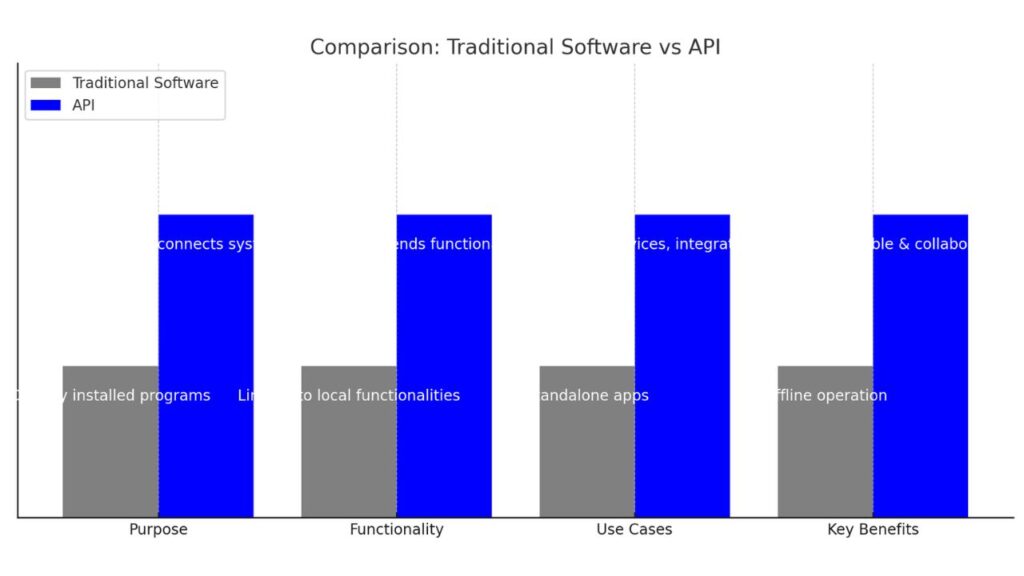
The chart visually compares Traditional Software with APIs based on key aspects:
- Purpose: Traditional software operates as standalone programs, while APIs interconnect systems.
- Functionality: Traditional tools have limited local functionalities, while APIs extend capabilities across platforms.
- Use Cases: Traditional software focuses on individual apps, while APIs power web services and integrations.
- Key Benefits: Traditional systems work offline, whereas APIs offer scalability and collaboration.
APIs enable seamless interaction and are central to modern digital ecosystems. Would you like a detailed explanation of any aspect?
How do APIs work?
APIs connect software applications by allowing one application (the client) to request data or service from another (the server) using standard protocols.
Core Mechanism
APIs work by making a request to a server, which can then either process what has been received and sends back data such as JSON or XML; Keys are necessary to authenticate the user with the API. The most common HTTP methods are GET (return data), POST (create new entry), PUT (update an entry), and DELETE(remove an entry). According to JWT.io, “To authorize a request, provide your API key by including the Authorization: Bearer directive in the HTTP headers.”.
Key Components
- Client: The entity that puts in the request, such as mobile app requesting for weather.
- Endpoint: Server where a request is received and processed according to defined policy.
- Headers and Body: Transport request parameters, formats, and payloads.
Common Protocols
REST APIs, the most common today, are built on top of HTTP and use it to induce stateless access to resources with help of standard formats like JSON. You could also look at things like SOAP-based for structured messaging, and RPC-like for call-based. The documentation specifies the endpoints, methods and schema for usage.
Real-World Example
A music app asks playlist from a repository API instead of hoarding all the tracks, helping in development. On e-commerce websites payment APIs (like PayPal) would be called in much the same way.
Types of APIs – Types by Use Case
APIs fall roughly into categories based on what they do: data APIs connect apps to databases for pull-requesting info easily; OS APIs let apps use computer basics like files or screens; remote APIs connect apps on different machines over networks; web APIs share information online with links using the web like most modern apps.
Open APIs
Open APIs are free for all, in the way that a public library is—you can pull data or tools by simple web calls, only basic keys needed. Consider weather apps sucking down rain data to your phone.
Partner APIs
Partner APIs are shared with business friends only, after registering quickly and setting the password — like a club for company partners to connect services securely. Banks are using them to link payment tools without opening to all comers.
Internal APIs
Internal APIs are more about how things work within a company where no one else can see — like private office tools that let teams chat, or share files, fast. They make work faster with no extrinsic risks.
Composite APIs
Composite APIs combine multiple APIs into a single, fast call, saving time — similar to ordering an entire meal rather than individual dishes. Ideal for apps that require data from numerous places at the same time.
Other APIs
Less Common APIs
Scarce are APIs that manage particular tasks outside of web sharing: hardware APIs chat with devices such as cameras; library APIs enable shortcuts for code sleights; program APIs perform remote jobs like local ones.
Hardware APIs
By that time, the emerging standards for hardware APIs in Web browsers will allow apps to control a range of devices safely with a minimal risk of crashes — say, telling your phone’s camera to snap a photo. They are also employed by printers or sensors.
Library APIs
Library APIs are existing software helpers, like a math calculator or map drawer that you can plug into your app. They save time on basic jobs.
Program APIs
Program APIs bridge the gap between distant code and your working environment in the present, as though you’re calling a mechanic across town to get you running again quickly. They use simple network calls.
Example
Weather APIs
Weather apps pull up-to-the-moment rain or sun data from outfits like OpenWeatherMap — your phone queries them, and they send back forecasts without outfitting their own weather stations. Single speedy apps do this to display local updates quickly.
Google Maps API
Google Maps API injects directions or store finders right into ride apps or sites — like having Uber show you the path your driver took, or stores list nearby spots. It has a way it does maps without having to create one from the ground up.
Payment gateway – PayPal API
Internet shops use the PayPal API for secure checkouts—you click “Pay Now”, it gets your go-ahead, collects some cash and tells the shopkeeper it’s sorted. Stores don’t need to deal with cards directly.
Social media – Twitter Bots API
On Twitter, bots respond to tweets or issue reminders using its API — for example, one that nudges you to drink water every hour based on your posts. Watch for the words and act reflexively.
Slack API
Slack API creates team bots that can post alerts or link tools — like telling your channel when a sale is made or job completed. Helps to keep chat more useful without leaving the app.
Comments are closed.